
Background jobs
How WP-Cron and Action Scheduler drive Automation Jobs, Catalog watch and the Store Index, and what to check when background work stalls.
Three different plugin features run unattended in the background, Automation Jobs, Catalog watch, and the AI Store Index, and they rely on two different WordPress scheduling systems. Knowing which is which tells you where to look when something seems stuck.
Before you start
- WordPress has no real background daemon. By default, WordPress checks for due scheduled work (
wp-cron.php) only when something visits your site. A quiet store can delay background work simply because nobody loaded a page recently. - Action Scheduler (bundled with WooCommerce) is a sturdier queue built on top of that same WP-Cron trigger: it stores its own list of pending, running, and completed actions in the database, visible on one screen regardless of which plugin scheduled them.
- Automation Jobs does not use Action Scheduler. It drives itself with two plain WP-Cron events of its own (one that advances jobs roughly every 5 minutes, one that watches for stuck jobs roughly every 2 minutes). Catalog watch and the AI Store Index do use Action Scheduler. This is why only two of the three show up on the screen below.
Seeing what is pending
For Catalog watch and Store Index work, WooCommerce > Status > Scheduled Actions is the real queue, independent of this plugin's own pages:
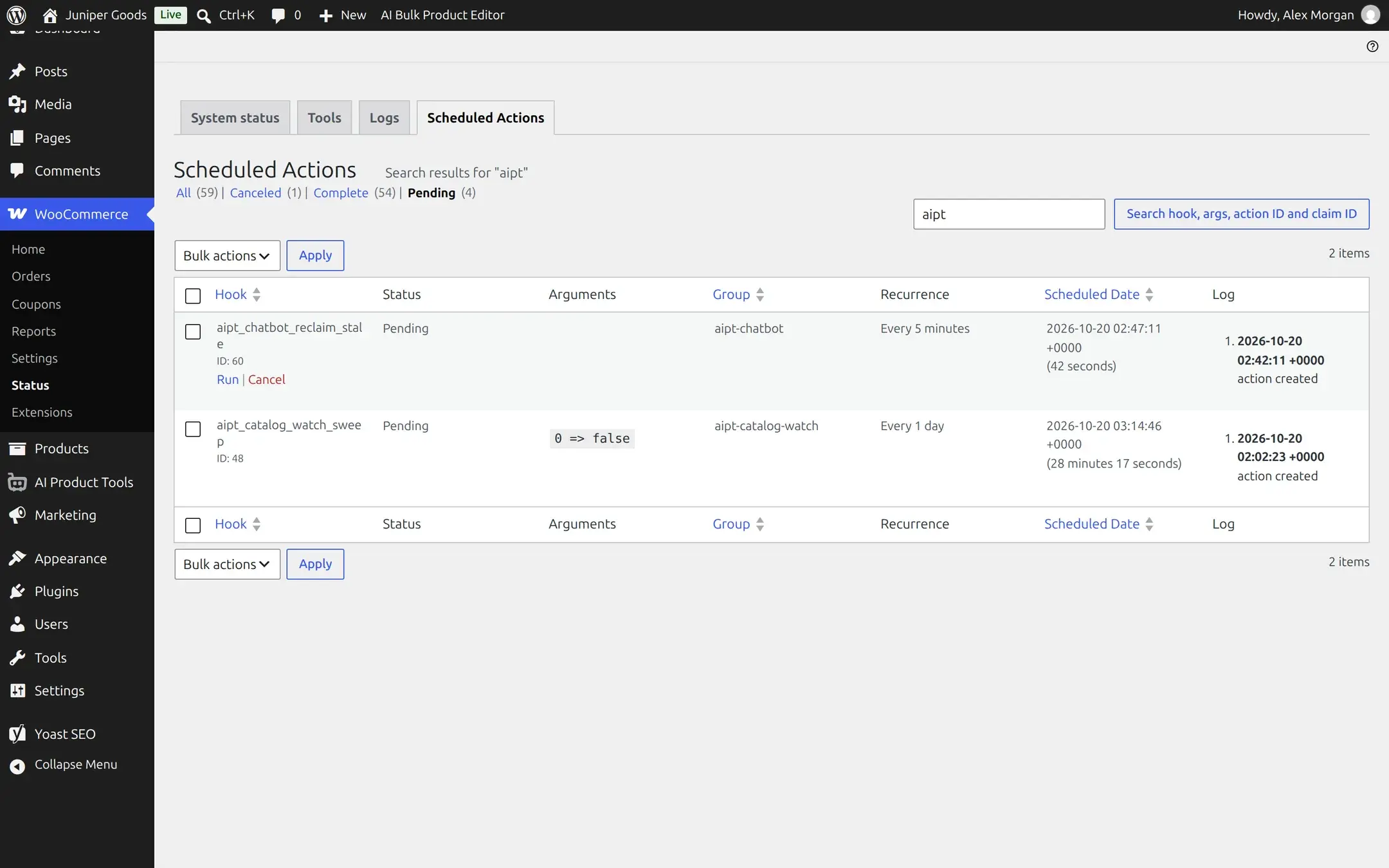
Each action's Log column (expand a row) shows every state change: created, started, completed, or failed, with a timestamp for each, which is the most reliable way to confirm whether something actually ran.
Automation Jobs will never appear on this screen
Its WP-Cron events are not named with the aipt prefix the way Action Scheduler hooks are, and it does not register as an Action Scheduler action at all. Check its own status on the Automation Jobs page instead.
WP-Cron is disabled
If DISABLE_WP_CRON is set to true in wp-config.php (common on hosts that run a real server cron instead), Automation Jobs shows a direct banner naming the exact cause:

Fix either by setting DISABLE_WP_CRON back to false, or, the better long-term fix on any real store, by configuring an actual server cron job that hits wp-cron.php on a schedule (ask your host; this is the standard, reliable way to run WordPress background work and works for Action Scheduler too). A job creation dialog offers a one-tab, in-browser polling fallback ("Continue with polling") for this exact situation, but it only advances jobs while that browser tab stays open, it is a stopgap, not a fix.
Jobs look stuck, but WP-Cron is not actually disabled
A quiet store can starve WP-Cron just as effectively as a misconfigured one: nothing visits the site, so the due-task check never fires. The plugin cannot prove this is happening, so when a non-terminal job's next run time is more than two minutes in the past with no sign of activity since, and the confirmed DISABLE_WP_CRON banner above is not already showing, it shows a softer, explicitly-hedged banner instead of a hard error:
Exact wording
"%d job(s) were due to run a while ago and show no sign of having started. This isn't confirmed proof of a server problem. WP-Cron reports as enabled, but it only runs on incoming site traffic, so a quiet site can delay it just as well as a stuck worker would." followed by either a note that this browser tab is already advancing jobs, or a Run jobs in this browser now link that does.
If you see this regularly, the real fix is the same one: a real server cron hitting wp-cron.php on a fixed interval, independent of visitor traffic. Run jobs in this browser now (when offered) advances the queue immediately as a one-time nudge, but only while that browser tab stays open.
A caching or security plugin blocks the loopback request
WP-Cron's own trigger (and, through it, Action Scheduler's) is a loopback HTTP request your site makes to itself. A caching, optimization, or security plugin that blocks, rewrites, or serves a cached response to that request can silently stop background work even though DISABLE_WP_CRON is false and the schedule looks correct. Signs to check:
- Jobs or Catalog watch sweeps consistently show as "due" but never move to running, even on a store with regular traffic.
- A firewall or "block bad bots" rule that treats WordPress's own loopback request as suspicious (no real browser headers, no cookies).
The fix is host-side: allowlist requests to your own site's wp-cron.php from itself, and exclude it from full-page caching.
PHP time and memory limits
Automation Jobs and Catalog watch deliberately process in small batches instead of one giant request for exactly this reason: a single PHP request on a modest host has a limited max_execution_time and memory_limit, and a few hundred products at once can exceed either. If a job or a Catalog watch sweep seems to restart or make partial progress repeatedly on a large catalog:
- Look for a PHP fatal error (memory exhausted, or "Maximum execution time exceeded") in your host's PHP error log around the time the batch ran.
- Ask your host to raise
memory_limitandmax_execution_timefor scheduled/cron requests specifically, they usually can without touching normal page loads. - Automation Jobs has no separate batch-size setting to lower, it processes its own queue per product, so a persistent out-of-memory pattern here points at the host, not a plugin setting to tune.