
AI providers
AI Product Tools is bring-your-own-key. Compare OpenAI, Google Gemini, Anthropic Claude and OpenRouter, pick a model, and understand what you pay.
AI Product Tools never runs its own AI. Every generator calls one of four providers with your own API key (BYOK), the provider answers, and the provider bills you directly. The plugin itself has no credits, usage allowances, or metering of any kind, on Free or Business.
All four providers, every model in their lists, and custom OpenRouter model IDs are available on every plan. Nothing about connecting a provider, choosing a model, or adding a custom OpenRouter model is locked behind an upgrade. A small number of unrelated fields elsewhere in Settings are Business-only; see Advanced settings for that list.
Where this is configured
You connect providers and pick defaults in AI Product Tools > Settings > Connection. See Connection settings for every field on that screen.
The four providers
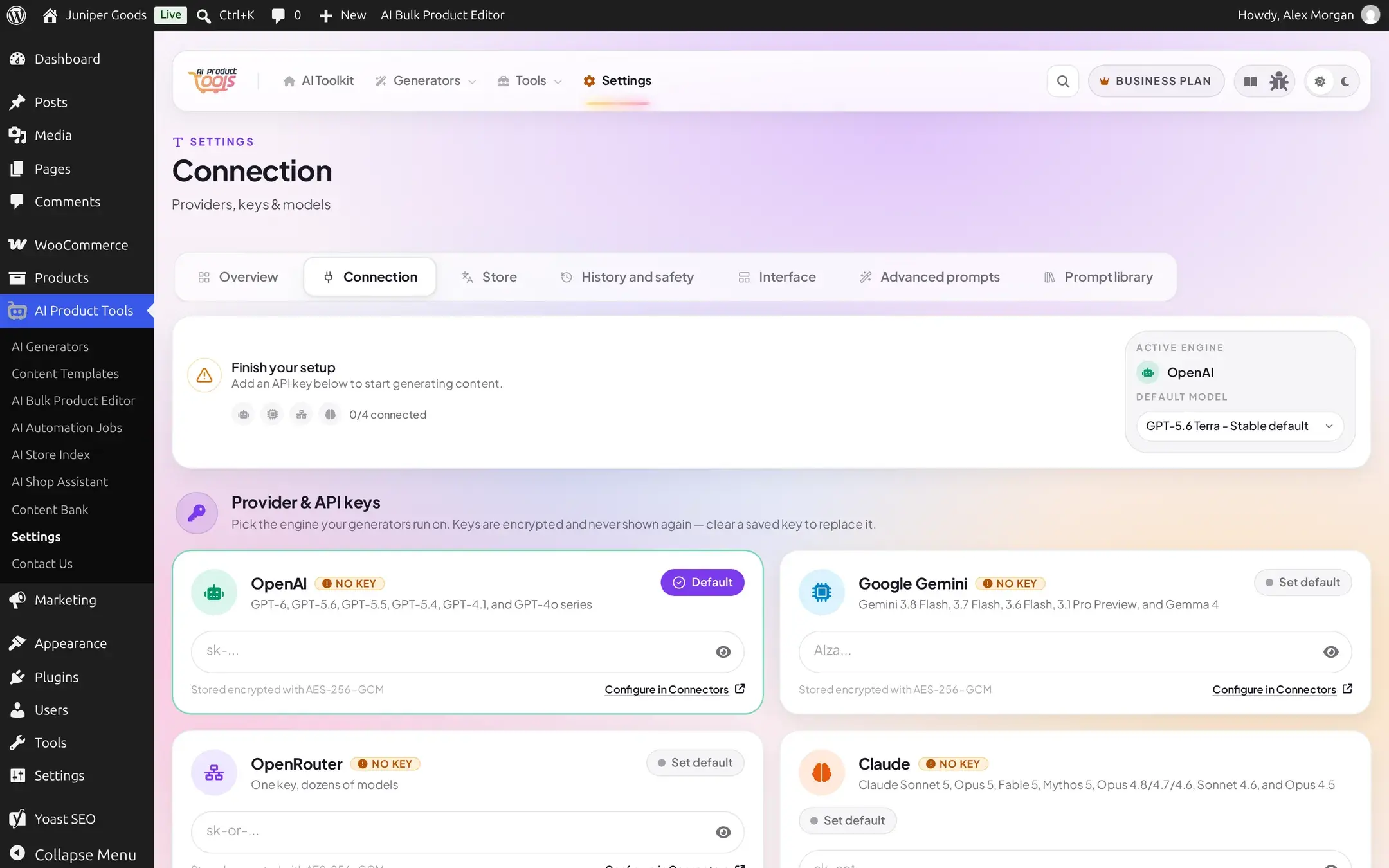
| Provider | Model families shown in Settings | Good at | Set up |
|---|---|---|---|
| OpenAI | GPT-6, GPT-5.6, GPT-5.5, GPT-5.4, GPT-4.1, GPT-4o series | A dependable, widely-used default for every generator | OpenAI setup |
| Google Gemini | Gemini 3.8 Flash, 3.7 Flash, 3.6 Flash, 3.1 Pro Preview, Gemma 4 | Fast, high-volume catalogs; a free-tier API key to start | Gemini setup |
| Anthropic Claude | Claude Sonnet 5, Opus 5, Fable 5, Mythos 5, Opus 4.8/4.7/4.6, Sonnet 4.6, Opus 4.5 | Careful, well-structured long-form writing | Claude setup |
| OpenRouter | One key, dozens of models from every major lab, plus any custom model ID you add | Trying many models without collecting a key for each one, or running a no-cost model | OpenRouter setup |
You do not have to pick just one. Configure as many providers as you like, mark one Default, and switch at any time. Several generator screens also have their own provider and model picker that overrides the Settings default for that one run only (see Switching per generation below).
Choosing a provider and model
There is no single right answer. Think about three things:
- Quality for your content. Longer, more nuanced writing (full descriptions, FAQs) benefits from a stronger model; short, formulaic fields (titles, alt text, tags) work well on a cheaper, faster model from the same provider.
- Cost. The plugin never meters usage, so your cost is whatever the provider charges for the tokens a run consumes. A faster or smaller model in the same family is almost always cheaper. OpenRouter is the one place you can run a model at no cost: its bundled list includes free-tier entries such as Gemma 4 31B IT (Free), and an Auto (Best Available Free) option that always routes to a working no-cost model without you tracking which one is currently available.
- Where your data should go. All four providers process the product data you send them under their own terms; read the provider's own privacy and data-retention policy if that matters for your catalog.
A practical approach: start with one provider's mid-tier model as your site default, run a few generations, and read the output. Switch the Default model in Settings, or pick a different model for one run from a generator's own toolbar, until the balance of quality and cost feels right. You are never locked in, there is no migration step to change your mind later.
Switching per generation
Most bulk generator screens (Description, Title, SEO Meta, FAQ, and others) show their own Provider and Model controls next to the Generate button. Choosing a different provider or model there only affects that one screen, in that browser, and does not change your site-wide default in Settings. This is why a generator can appear to use a different model than the one shown on the Settings overview: the generator's own last choice, remembered per browser, wins for that screen.
BYOK costs
Because generation is pure bring-your-own-key:
- You pay each provider directly, at that provider's own published rates, for exactly the tokens your runs use.
- AI Product Tools never adds a markup, a credit system, or a usage cap of its own.
- Switching providers or models changes what you pay the provider; it never changes anything about the plugin itself, which is priced on the Free and Business plans regardless of how much you generate.
- OpenRouter is worth a special mention here: it proxies many providers through one key and bills you through its own account, including models that cost nothing at all.
Switching providers later
Nothing about switching is destructive:
- Add the new provider's key in Settings > Connection (see Connection settings for the exact steps).
- Click Set default on its card, then Save Settings.
- Every generator that reads the site default picks up the new provider on its next run. Generators with their own remembered provider/model keep using that choice until you change it there too.
Clearing a provider's key when it is the current default automatically switches the default to another configured provider (or asks you to configure one, if none remain); see Connection settings for exactly what that looks like.
WordPress's own AI Connectors
If your host runs WordPress 7.0 or later, WordPress itself offers a central place to store AI provider keys (Settings > Connectors) that any plugin can read, including AI Product Tools. You can keep using the plugin's own local key storage, or move a key into WordPress Connectors so other AI-aware plugins can share it. See WordPress AI Connectors for how this works and what changes on older WordPress versions.
Troubleshooting
OpenAI
Create a key, enable billing, and connect it.
Google Gemini
Create a key and connect it.
Anthropic Claude
Create a key, enable billing, and connect it.
OpenRouter
One key, dozens of models, and custom model IDs.
WordPress AI Connectors
Share a key across every AI-aware plugin on WordPress 7.0+.
Connection settings
Every field on the Connection screen, in detail.