
Knowledge, Consent, and Contact Options
Teach the assistant from your own pages, collect shopper contact details with consent, and give shoppers a way to reach you directly.
Beyond the catalog itself, the assistant can read specific WordPress pages for store knowledge, collect a shopper's name and email before chatting, and offer WhatsApp or a fallback link when it cannot help. All of these live on the General tab of AI Product Tools > AI Shop Assistant, alongside the identity settings covered in Setting up the assistant.
Before you start
Have the pages you want the bot to read already published. Only published WordPress pages are selectable, drafts and private pages do not appear in any of the pickers on this page.
Teaching the assistant from your pages
Select Knowledge Pages
Knowledge Pages is a searchable checklist of every published page on your site. Pick the ones with information shoppers actually ask about, a Shipping & Returns page, a Size Guide, an FAQ. The assistant reads their content as additional context when it judges a question relevant, on top of whatever you wrote in Store Context.
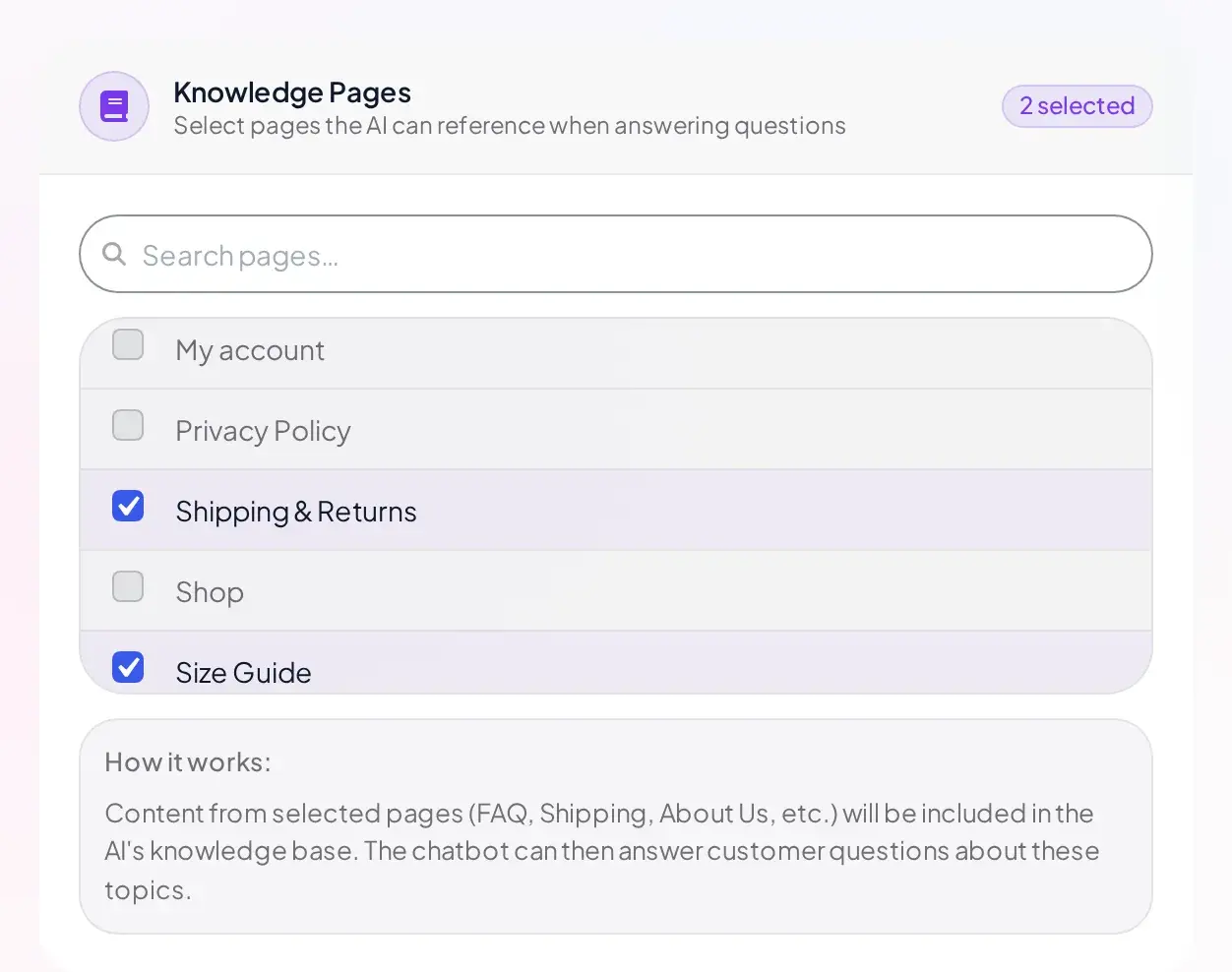
If no pages are published yet, the list reads "No published pages found." A search with no matches reads "No pages match your search."
Add legal links to the widget footer
Legal Pages offers two selects, Terms of Service Page and Privacy Policy Page, each defaulting to "None (hide link)." Pick a page in either and its link appears in the widget footer, opening in a new tab. This is also where the pre-chat form's consent checkbox gets the pages it links to.
Collecting contact details with consent
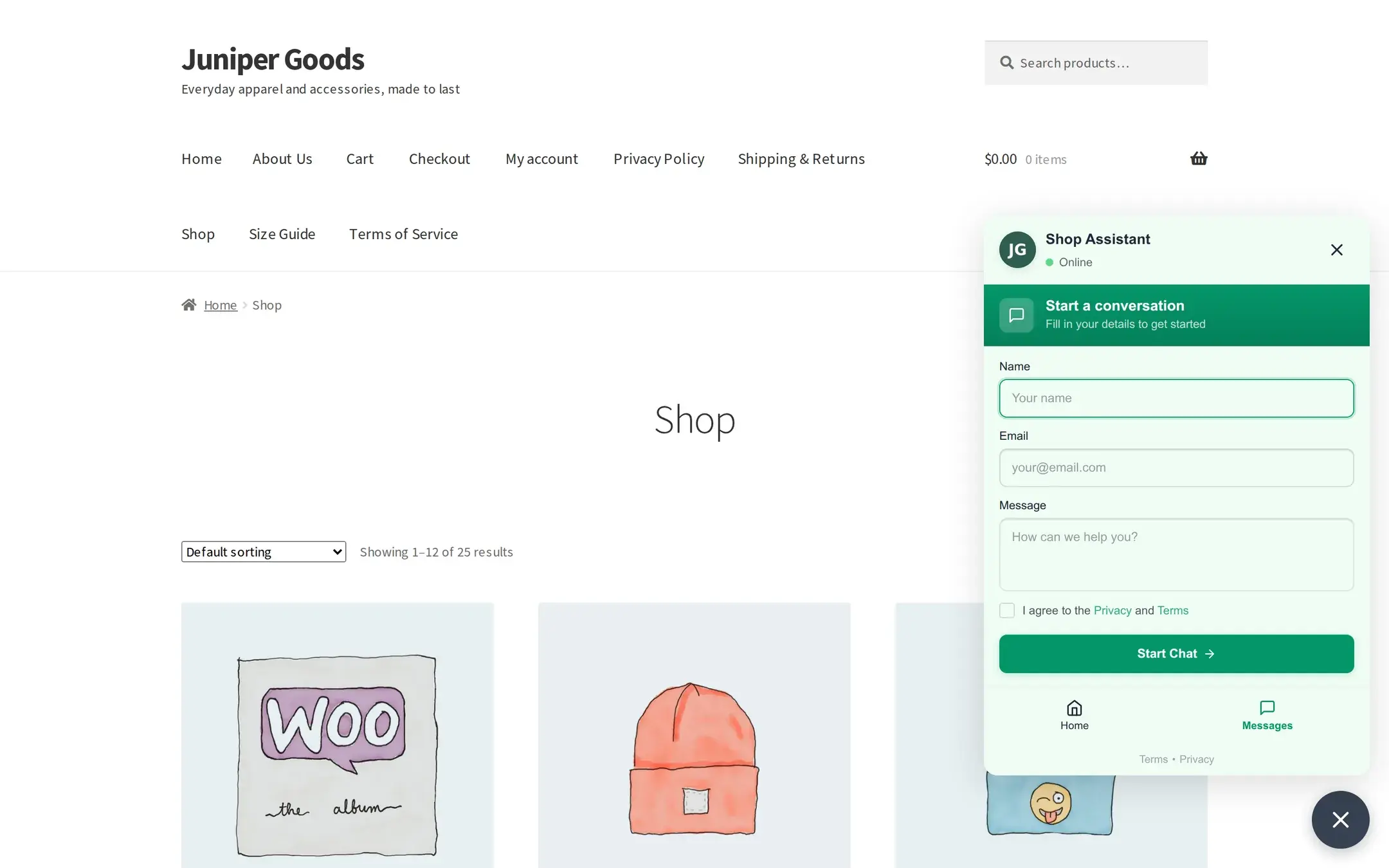
The Pre-Chat Form toggle (on by default) shows a short form, name, email, message, and a consent checkbox, before a shopper's first message reaches the bot. Its help text is explicit about why: "Collect visitor name and email before starting chat and show it to me in the queue messages section."
Consent is enforced, not just suggested
Name and email are stored only if the shopper explicitly checks consent. If you selected Terms and Privacy pages, the checkbox links to both; otherwise it shows a generic "I agree to the privacy policy" line. Every stored email is encrypted at rest before it ever reaches the database.
Turning the pre-chat form off does not stop the assistant from working, shoppers go straight to the conversation screen and the first message they type becomes the only message you see if it ever needs review, with no name or email attached.
Giving shoppers another way to reach you
- WhatsApp Contact (Optional): a phone number with country code (placeholder
+1234567890). When set, the widget's home screen shows a "Chat on WhatsApp" card that openswa.mewith that number in a new tab. Leave it empty to hide the option entirely. This field is free on every plan. - Fallback Contact URL: a URL shown when the chatbot hits an error it cannot recover from. Point it at a contact page, a support form, or an email link.
Combine both with the Error Display settings on the setup page so a shopper who hits a real error always has somewhere to go next. Add an escalation path like this:
Fill in a fallback and a WhatsApp number
On the General tab, set Fallback Contact URL and, if you offer WhatsApp support, WhatsApp Contact.
Check what shoppers could not get answered
Questions the assistant genuinely could not process (not simply questions it did not know the answer to) land in Message Queue. See Unanswered questions.
Reply directly on Business
Open a queued message and use Reply to Message to answer by hand. On Free, reply outside the plugin using the shopper's email, if they consented to share it.
Reference
| Setting | What it does | Default | Plan |
|---|---|---|---|
| Pre-Chat Form | Collect name, email, and a message before chatting, with consent | On | Free |
| Knowledge Pages | Published pages the assistant can read for context | none selected | Free |
| WhatsApp Contact | Phone number for a "Chat on WhatsApp" card on the widget's home screen | empty (hidden) | Free |
| Fallback Contact URL | Link shown when the chatbot encounters an error | empty | Free |
| Terms of Service Page / Privacy Policy Page | Footer links in the widget, and the pre-chat consent links | None (hidden) | Free |
Where this data is stored
- Chat messages that need admin attention live in a dedicated database table. Name and email are stored only with consent, and the email is encrypted at rest using AES-256-GCM.
- No product field is ever written back by the assistant. It only reads your catalog; the one exception is Add to Cart on Business, which is a normal WooCommerce cart action, not a product edit.