
Content Bank
Where every AI change to your catalog lives: a searchable history, a queue of content waiting for your decision, and the drafts your automations collected.
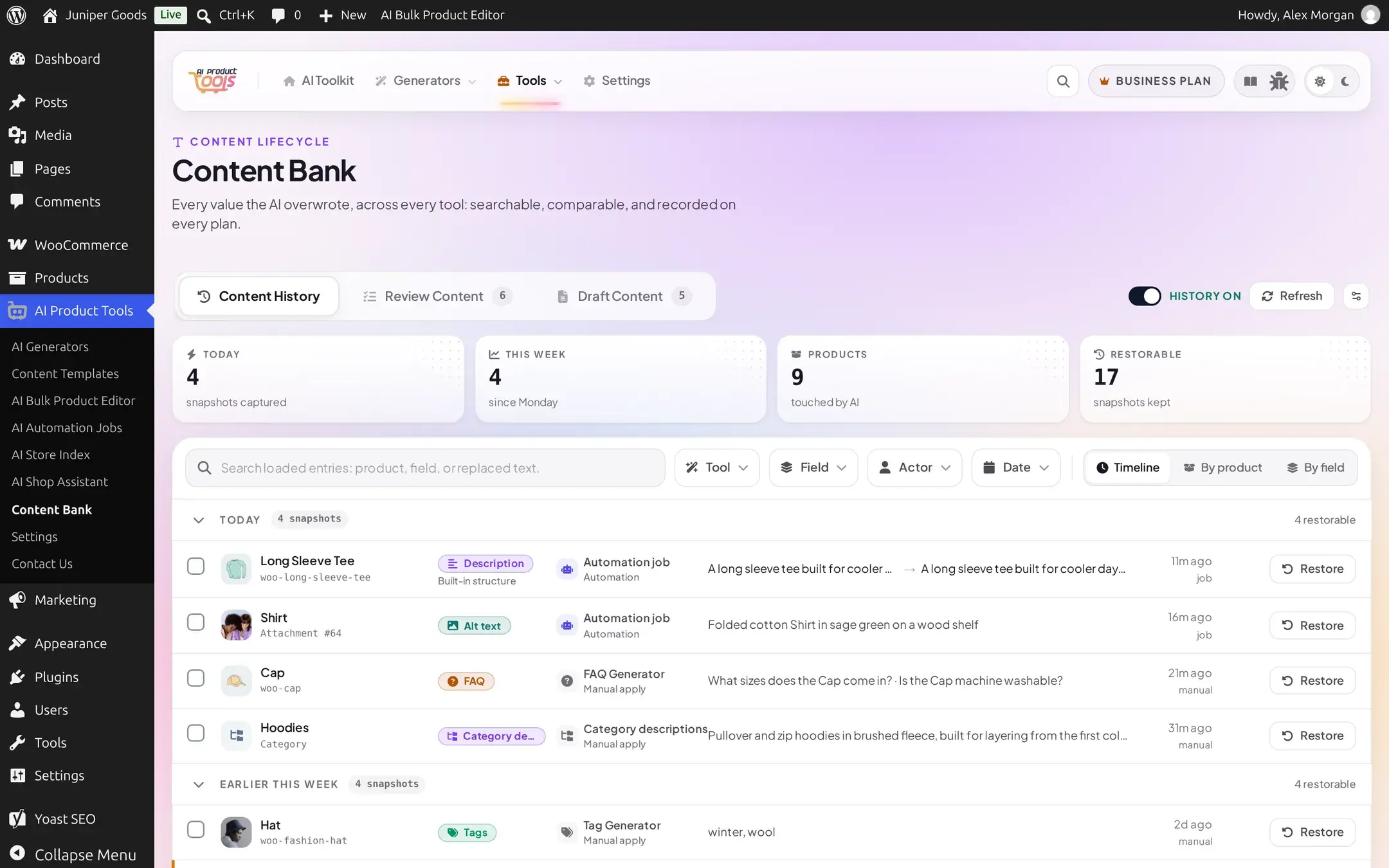
Content Bank is the one place that shows what the AI has done to your catalog and what it is waiting to do next. It has three tabs:
- Content History: every value the AI has ever overwritten on a product or category, with a before/after comparison. Available on every plan.
- Review Content: content a generator produced but has not written to a product yet, waiting for you to approve or reject it. Business
- Draft Content: what your automation jobs wrote instead of publishing, also waiting for your approval. Business
Before you start
- Content History needs nothing: it records automatically from the moment the plugin is active, on every plan.
- Review Content and Draft Content are Business features. On a Free site both tabs show an upgrade teaser instead of a queue, and no network request is made to load one.
- Restoring a past value (inside Content History) is also Business-only. Reading history, filtering it, and comparing versions is universal.
How to get here
- Left nav: AI Product Tools > Content Bank.
- A History button on every bulk generator page (Description, Title, FAQ, SEO Meta, Image Alt, Category descriptions), on the Product Editor, and on the Automation Jobs page. It deep-links straight into Content History, pre-filtered to that product or tool.
- The Automation Jobs page's own Draft Contents tab redirects here, to the Draft Content tab.
The page URL keeps its original address, admin.php?page=aipt-history, for compatibility with older bookmarks and with the links above. The open tab rides in the URL too (&tab=history, &tab=review, or &tab=drafts), so you can bookmark or share a link straight to one.
The three tabs
Content History
Browse, filter, and compare every AI change. Turn history on or off, and set how many versions to keep.
Review Content
Approve or reject content a generator staged for review before it reaches a product.
Draft Content
Approve, reject, or delete what a scheduled automation job wrote instead of publishing.
Restore a past value
Put a product or category field back to an earlier, or its very first, value.
A shared row anatomy
History, Review, and Draft rows all read the same way, so moving between tabs feels like switching a filter rather than learning a new screen. Each row shows:
- Who or what it belongs to: a product (with thumbnail and SKU), a category, or an image attachment.
- A field badge: the short label you actually see on the badge itself: Title, Description, Short desc., Tags, FAQ, SEO title, SEO desc., Alt text, or Category desc. ("Description" is the long description field, and "Alt text" is image alt text.)
- A structure chip (only when one was recorded): the content structure, or "Blueprint," that produced the value, for example "Structure: Apparel Essentials version 2" or "Built-in structure." A write that did not go through the content structure engine, such as an older entry or one made before 2.8.0, shows no chip at all rather than a guess.
- A source badge: which tool produced it (Description Generator, Title Generator, FAQ Generator, SEO Meta Generator, Image Alt Generator, Tag Generator, Bulk Product Editor, Category descriptions, CSV import, or Restored), and whether it ran as an Automation or a Manual apply.
- A preview of the value, and on Content History's diffable fields (title, long description, short description) a compact before/after.
- When it happened, in relative and absolute time.
Where automation output actually lands
An automation job's output never appears in Review Content. When a job's Content Delivery is set to Stage for Review, its results go to Draft Content instead, attributed to the job that produced them. Review Content is fed by the generator pages, when you run one with a Business review mode. See How bulk generation works for the generator side, and Create an automation job for the scheduling side.
Free vs Business
| Free | Business | |
|---|---|---|
| Content History: browse, filter, group, compare | Yes | Yes |
| Content History: turn on/off, set retention | Yes (with settings access) | Yes |
| Restore a value | No | Yes |
| Review Content | Upgrade teaser only | Full queue |
| Draft Content | Upgrade teaser only | Full queue |
Every plan keeps the full record: a Free site never loses what the AI changed, it just cannot put an earlier value back without Business, and review-before-apply stays switched off.
History and safety settings
Where the Content History on/off switch and retention slider also live, outside Content Bank.
Automation
Schedule a bulk generator to run unattended, and choose whether its output publishes directly or waits for your approval.
How bulk generation works
Selection, generation modes, and the review-before-apply choice on every generator page.