
Unanswered Questions
Review every conversation the assistant has had, see what it could not answer, and reply by hand on Business.
The Message Queue tab on AI Product Tools > AI Shop Assistant is a log of every chat exchange, not only the ones that failed. Every successful reply the bot gives is recorded here too, so you can audit what shoppers are actually asking. The tab label shows a live unread-count badge (capped at "99+") for messages still awaiting a response.
Before you start
The assistant needs to have had at least one conversation. See What shoppers see to try it yourself first.
What lands here, and why
A row is created every time a shopper exchanges a message with the bot. Most become Responded, a normal successful exchange, kept for your records. A row only needs your attention when the AI call itself genuinely failed, a provider rate limit, an authentication error, a content filter rejection, not simply when the bot said it could not find a matching product. A question like "do you sell office chairs?" that gets a polite "I could not find an exact match" reply is a successful, fully answered exchange, it will show as Responded, not Awaiting.
Statuses at a glance
Awaiting (shown internally as queued): the AI call failed and a shopper is waiting on you. Responded: either a normal AI reply, or a queued message you (or, under advanced setups, a retry job) answered. Failed: every retry attempt was exhausted. Retried: a retry attempt failed but has not yet hit the limit. Info: a first-contact record created purely because a shopper gave consent and an email, with nothing that needs an answer.
Open the queue
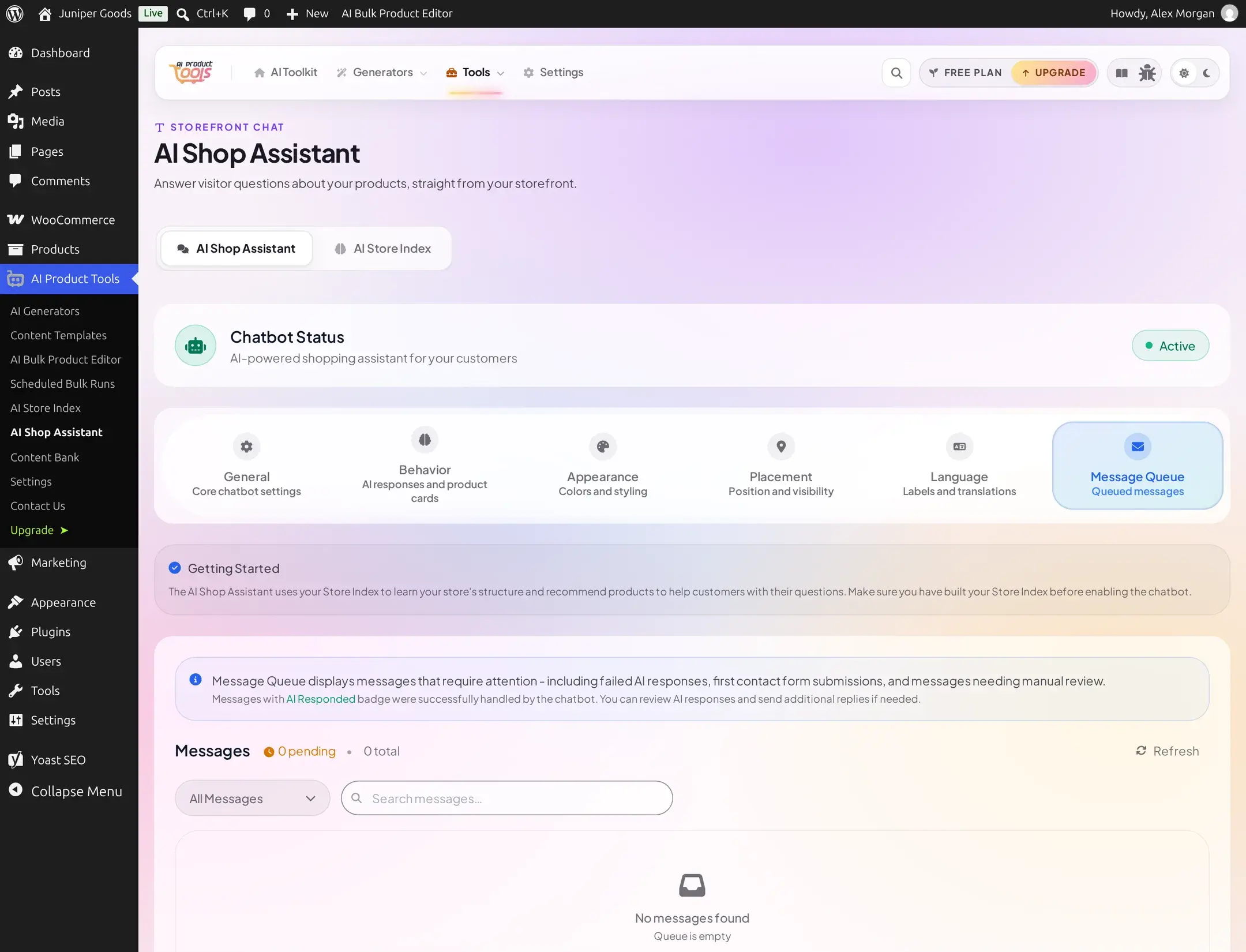
Go to AI Product Tools > AI Shop Assistant > Message Queue, or jump straight there with admin.php?page=aipt-chatbot&tab=queue. An empty queue shows an inbox icon with "No messages found" and, underneath it, "Queue is empty."
Filter, search, and page through messages
A stats row reads "n pending / n total," with "n selected" joining it once you check at least one row. Filter by status (All Messages, Awaiting, Responded, Failed), search message text, and page through results with "Page x of y." A search with no matches reads "No messages found" with a "Try a different search" hint. Each row already shows the shopper's name (when consent was given) and, for Awaiting, Failed, and Retried rows, the exact provider error text inline, no need to open anything just to see what went wrong.

Select and clean up in bulk
Check individual rows or use "Select all", then Delete (or "Delete (n)") to remove them, or "Delete All" to clear everything matching the current filter.
Reply to a queued message (Business)
Every row has its own Reply button. Click it on an Awaiting row to open the "Reply to Message" dialog, which repeats the shopper's contact details (name, email, and when they gave consent) and the exact provider error above a Your Response box. Type your answer and Send; the shopper's email, if they consented to share it, receives your reply, and the row moves to Responded.
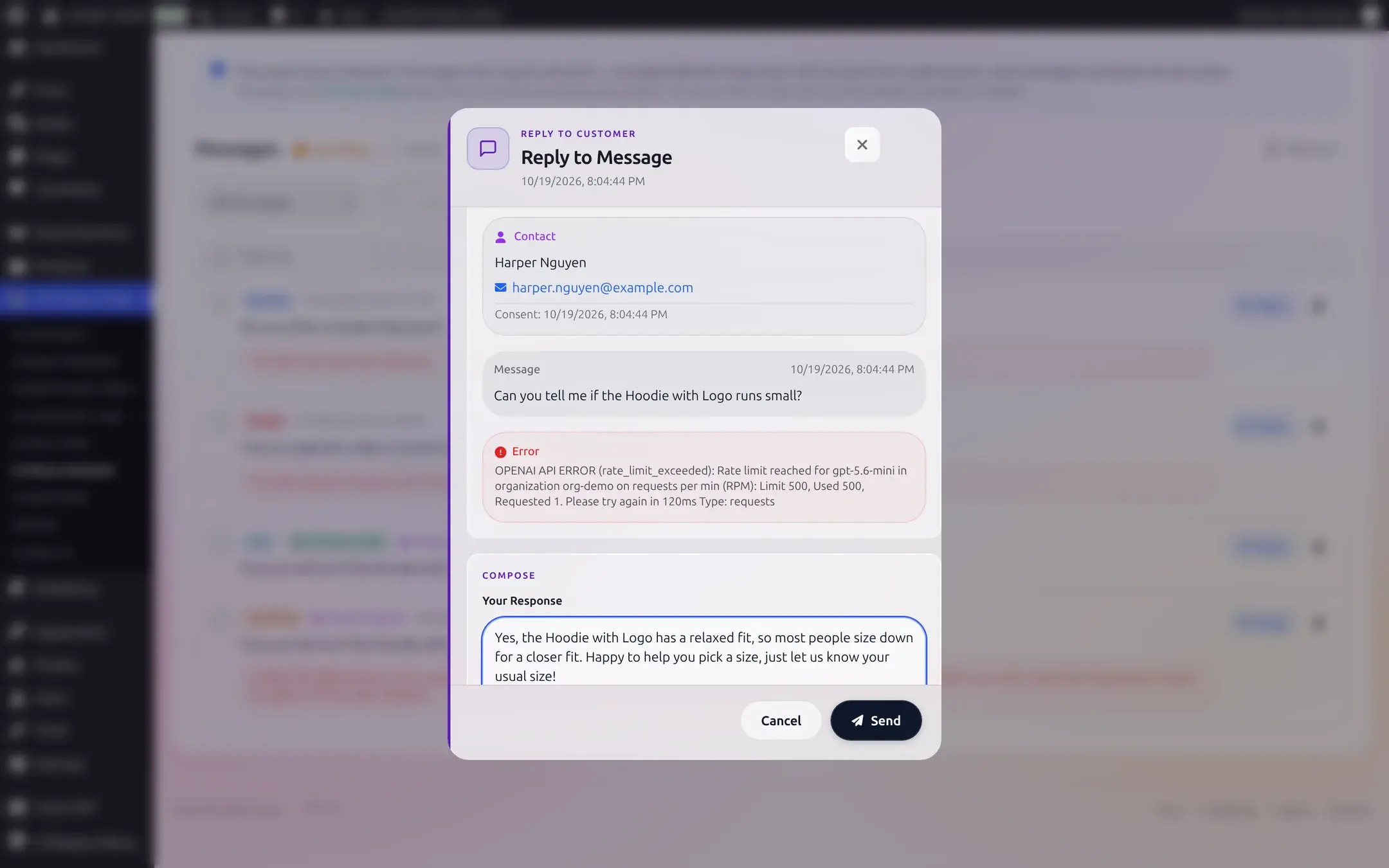
On Free, the message is still fully readable, name and email included if consent was given, the compose box itself is what requires Business.
Reference
| Status (shown as) | Internal value | Meaning |
|---|---|---|
| Awaiting | queued | AI call failed; needs a reply |
| Responded | responded | successful exchange, or a queued message you answered |
| Failed | failed | every retry attempt exhausted |
| Retried | retried | a retry attempt failed, more attempts remain |
| Info | info | first-contact record only, consent given with an email, nothing to answer |
| Setting | What it does | Plan |
|---|---|---|
| Search, status filter, pagination | Find messages | Free |
| Bulk select, Delete, Delete All | Clean up the queue | Free |
| Reply to Message | Answer a queued shopper directly from the plugin | Business |
Troubleshooting
For developers: a fast first check
Logged in as an administrator, GET /wp-json/aipt/v1/diag returns, per AI provider, whether a key is configured, the last authentication error, and a same-site connectivity self-test. It is a good first thing to ask a confused support ticket to fetch.
Related pages
Knowledge, Consent, and Contact Options
Teach the assistant from your own pages, collect shopper contact details with consent, and give shoppers a way to reach you directly.
What Shoppers See
The launcher, the home screen, a real conversation with product cards, mobile view, and what errors look like to a shopper.