
Advanced
Defaults used only by the legacy custom-prompts generation path, for stores not using a content structure.
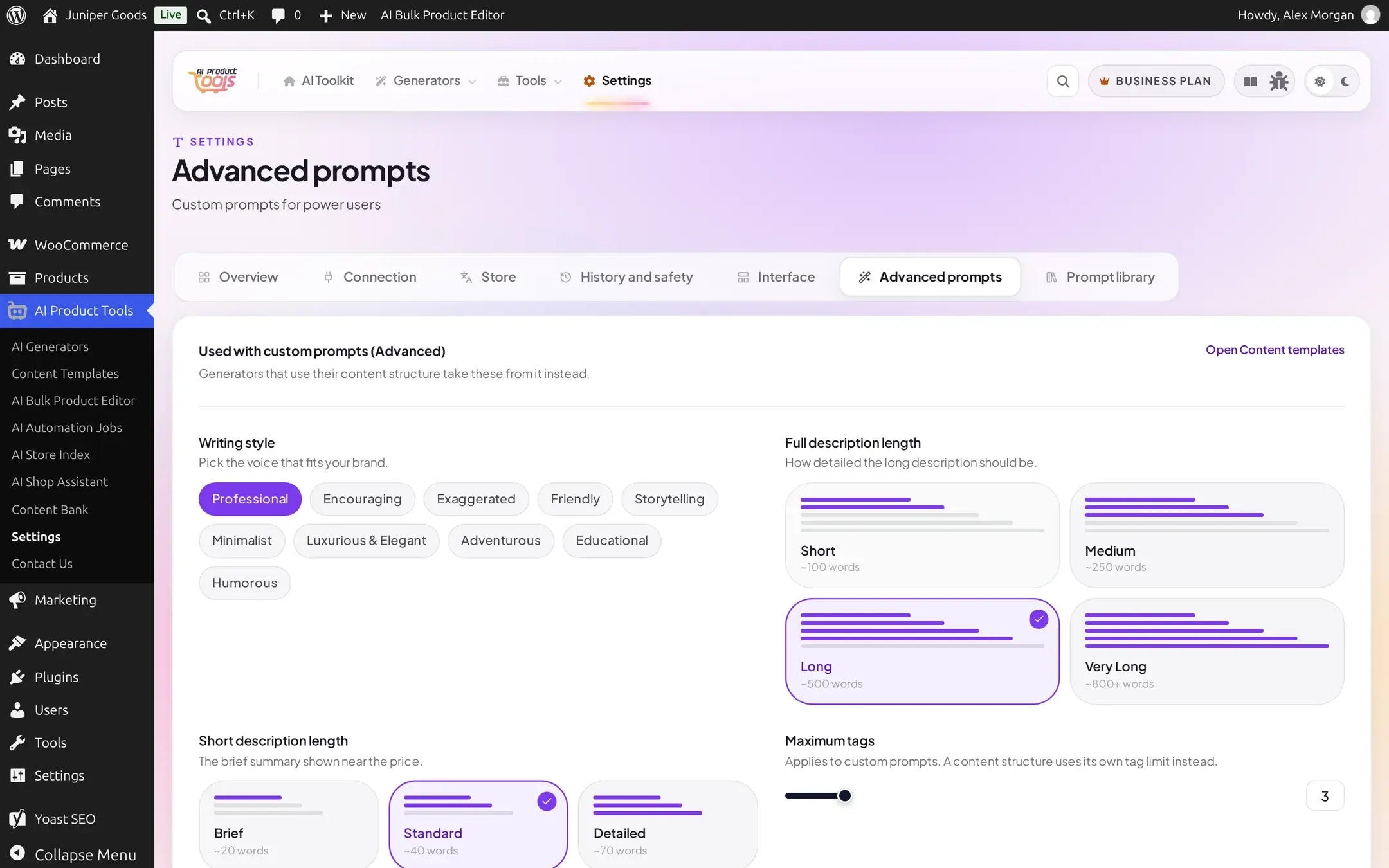
AI Product Tools > Settings > Advanced prompts holds fields that only the custom-prompts generation path reads. A generator run through a content structure (the default on every new site, see How bulk generation works) ignores every field on this page entirely and uses its own structure settings instead.
Is this page for you?
If your generators use a content structure (1 Content structure / 2 Generation tabs on each generator page, see Editing a structure), these fields do not apply to you. They exist for the older, raw custom-prompt editing path.
Reference
| Setting | What it does | Default / limits | Plan |
|---|---|---|---|
| Writing style | The voice custom prompts write in: Professional, Encouraging, Exaggerated, Friendly, Storytelling, Minimalist, Luxurious & Elegant, Adventurous, Educational, or Humorous | Professional | Free |
| Full description length | Target length for a custom-prompt full description: Short (~100 words), Medium (~250), Long (~500), or Very Long (~800+) | Long | Free |
| Short description length | Target length for a custom-prompt short description: Brief (~20 words), Standard (~40), or Detailed (~70) | Standard | Free |
| Maximum tags | How many tags a custom-prompt run requests | 1 to 20, default 3 | Free |
| Brand context for custom prompts | Free-text background the AI reads before writing | Empty | Free |
| Allowed HTML tags | Which HTML tags a custom-prompt answer is allowed to contain | A built-in safe default list | Free |
Every field above is available on Free. What is Business-gated lives one level deeper, on each individual generator's own Content Templates screen, not on this page:
Business-gated fields live elsewhere
A handful of per-generator additional prompt fields (on Title, FAQ, SEO Meta, Taxonomy, and Image Alt) and the example descriptions fields are Business-only. On Free, the field still renders so you can see what it does, but a save silently keeps its old value and the save response flags it as skipped, the Settings save bar then shows a warning naming the exact field instead of falsely claiming everything saved. Nothing is hard-locked at the input level from this page alone. See Content Templates for the full list and what each one does.
Prompt library
A second sub-view, Prompt library, reached from the same navigation, holds saved prompt templates, variables, and examples. That is a large enough topic to live on its own page; see Content Templates for it.
Free vs Business
Every field directly on this Advanced prompts page is available on Free. The Business-only fields mentioned above live on each generator's own Content Templates screen, reached through Open Content templates from this page.